
Modern Checkout Platforms A Playbook for Higher Conversion and Lower Risk

Modern Checkout Platforms: A Playbook for Higher Conversion and Lower Risk

For most online businesses, the checkout is where growth is won or lost. Many carts are still abandoned at the last step, usually because the experience is slow, confusing, or doesn’t offer a preferred way to pay. Teams also struggle to keep up with regional payment preferences and the ongoing demands of compliance and security. In other words, the pain points are familiar: preventable friction that drags down conversion, gaps in payment method coverage that limit market reach, and rising standards around data protection that stretch already‑thin resources. This guide explains how to design, evaluate, and implement a modern checkout payment platform that reduces friction, expands acceptance, and strengthens trust—without turning your roadmap into a multi‑year build.

Evaluating a Modern Checkout Platform

Evaluating providers like the Antom checkout payment gateway alongside comparable providers such as PayPal and Adyen helps clarify what “good” looks like: broad, localized payment coverage, multi‑device checkout (including large screens), and flexible integration paths (API, SDK, or a streamlined one‑step setup). Use these capabilities—not brand recognition—to build an evidence‑based rubric for your business.

Core Capabilities to Expect

Payment method coverage

Shoppers expect to “pay their way.” A capable platform should support major card networks, digital wallets, online banking, account‑to‑account rails, and relevant local methods. The aim isn’t to list everything at once; it’s to localize intelligently so the most trusted options appear first for each market. The result is fewer dead ends at payment and better authorization performance.

Device and channel support

Real checkouts live on phones, tablets, desktops, TVs, and consoles. Look for responsive components and cross‑device handoff patterns that eliminate typing (for example, scanning a QR code on a TV to complete payment on a phone). On small screens, short single‑column forms, large tap targets, and express buttons can meaningfully cut drop‑off.

Integration models (API, SDK, one‑step)

Most teams choose among three tracks:

  • Server‑side API for full control over the UX and orchestration.
  • Client SDK / components for faster launch with vetted UI elements.
  • Hosted or “one‑step” checkout to move faster and reduce compliance scope.
    Pick the track that matches your resources and the level of customization you truly need. Regardless of path, insist on a versioned API, idempotency for payment requests, webhooks for state changes, and a realistic sandbox.

Risk and security features

Security can’t be an afterthought. A modern checkout platform should minimize the data you touch, support strong authentication, and provide configurable fraud controls (velocity limits, device signals, behavioral cues, allow/deny lists). Align your plans with current PCI DSS requirements and make sure logs, encryption, patching, and vendor oversight are well understood between you and your provider.

Designing the Checkout Experience

Presenting relevant payment options

Relevance beats bloat. Start by detecting the locale and device to prioritize the methods customers actually trust. Keep forms short with autofill, sensible defaults, and clear inline error messages. Offer guest checkout to remove account creation as a blocker. Where supported, provide express wallet buttons near the top of the flow to compress time‑to‑pay.

Cross‑device UX considerations

On mobile, reduce keystrokes: number pads for numeric fields, address lookup, and card masking. On large screens, consider handoff patterns—let users scan a code with their phone and complete payment on a familiar device. Always provide a clear way to resume the original session after any redirect or app switch.

Implementation Considerations

Choosing an integration track

  • Fastest launch: go with hosted/one‑step; fewer moving parts and a smaller compliance footprint.
  • Balanced control and speed: use client SDKs; native elements reduce implementation risk while preserving brand fit.
  • Maximum control: pick server‑side APIs; you own every detail of the flow (and the responsibility that comes with it).
    Whichever path you choose, plan your event model early (auth, capture, refund, dispute, payout) so downstream accounting and reporting stay clean.

Rollout scope and scaling

Start with one region and a short list of high‑impact methods, then expand. Feature‑flag payment methods so you can A/B test placement and ordering without redeploying code. Expect to add newly popular wallets or bank rails periodically; your provider should allow you to switch them on with minimal or no additional integration work.

Risk management integration

Introduce risk alongside UX changes. Begin with conservative rules, then tune. Establish thresholds for velocity and retry behavior, handle 3‑D Secure or similar step‑ups gracefully, and agree on dispute workflows and evidence templates. Good tooling lets you review cases, export data for analysis, and monitor lift versus liability as you iterate.

Comparison of Integration Models

Integration modelWhen to useWhat you getConsiderations
Hosted / one‑stepYou need to ship quickly and lower the PCI scopePre‑built, optimized UI maintained by the providerFewer layout tweaks; roadmap follows the provider
Client SDK / componentsModerate dev effort with strong brand controlVetted components, easier updates, sensible defaultsVersioning discipline; some scope remains
Server‑side APIComplex flows, custom offers, orchestration needsFull flexibility and advanced routing logicHighest build/maintenance effort; strongest compliance ownership

Evaluation Framework for Procurement and Product Teams

Functional fit

  • Coverage for target countries and the payment methods your users actually pick.
  • Support for subscriptions, partial captures, refunds, and reconciled payouts.
  • The ability to add methods or markets without a major reintegration.

Technical fit

  • Clear API/SDK/hosted options, versioning, idempotency, and robust webhooks.
  • Multi‑device patterns (including QR handoff) and responsive UI components.
  • Test environments that mirror production behavior closely, including error cases.

Risk & operations

  • Alignment with current PCI expectations and a clear shared‑responsibility model.
  • Transparent fraud tooling and reporting, including dispute workflows.
  • Accountable SLAs, incident communications, and uptime transparency.

Conclusion

Checkout success is mostly about removing effort and uncertainty. When the right methods appear at the right time, forms stay short and forgiving, and security feels seamless, more shoppers follow through. Use the capabilities and patterns in this playbook to evaluate providers and plan your rollout. One careful quarter of investment can compound into years of higher conversion, lower support burden, and fewer financial and risk surprises.


Are Smart Lockers the Missing Link in the Delivery Chain?

Are Smart Lockers the Missing Link in the Delivery Chain?

In an era defined by instant gratification, the pressure on supply chains has never been higher. Customers expect fast, secure, and flexible delivery options, and businesses are racing to meet those expectations. One innovation that’s been quietly gaining traction is the smart locker. But are smart lockers just another convenience, or are they the crucial missing link in the modern delivery chain?

Let’s dive into how smart lockers are reshaping logistics, enhancing customer experience, and solving some of the delivery industry’s biggest pain points.

The Problem with Traditional Deliveries

While e-commerce has exploded in recent years, the last mile of delivery continues to be one of the most expensive and inefficient parts of the supply chain. Missed deliveries, porch theft, incorrect addresses, and limited delivery time windows all contribute to delays, customer dissatisfaction, and rising costs.

For businesses, these issues mean more re-delivery attempts, strained courier resources, and increased carbon emissions. For consumers, it can result in frustration and a lack of confidence in online shopping, especially when they can’t be home to receive a parcel or need to return an item with minimal hassle. Clearly, something has to give.

Enter Smart Lockers

Smart lockers are secure, automated storage units that allow consumers to collect or return packages at their convenience—often 24/7. These lockers are typically located in public areas such as supermarkets, residential buildings, transportation hubs, or office complexes. The process is simple: once a delivery arrives, the recipient is sent a code or QR scan to open the locker and collect their package.

From a logistical point of view, smart lockers reduce failed deliveries, cut down on the time couriers spend navigating apartment blocks or remote addresses, and allow for consolidated delivery points. These benefits not only save money but also help reduce a company’s environmental footprint.

Enhancing the Consumer Experience

Consumer behavior has changed significantly. People want more control over when and how they receive their orders. Smart lockers provide a self-service solution that matches modern lifestyles—whether it’s picking up a birthday gift late at night or returning an online purchase during a morning commute.

The rise of hybrid work models has only amplified the need for delivery flexibility. With fewer people consistently working from home, the chances of someone being available to sign for a parcel are slim. Smart lockers offer an appealing alternative: reliable, contactless pickup without the need to interact with couriers or wait at home for a delivery window.

Streamlining Returns

Returns are a significant component of the e-commerce experience, especially in sectors like fashion and electronics. Customers are more likely to purchase when they know the return process is quick and hassle-free. Smart lockers have become a go-to solution for brands seeking to simplify returns for their customers.

Instead of printing a label and waiting for a courier or queueing at the post office, consumers can drop off their package at a designated locker at any time of day. For example, parcel locker returns are becoming an increasingly popular option for retailers and customers alike, offering convenience and faster turnaround for both parties.

This improvement in the reverse logistics chain boosts customer satisfaction and builds trust in the brand, which is critical in competitive online marketplaces.

Benefits for Retailers and Couriers

Smart lockers aren’t just a win for consumers. Retailers and courier services stand to gain significantly from integrating locker systems into their delivery strategy. Here’s how:

  • Lower Costs: Lockers enable bulk deliveries to a single location, which reduces the cost per parcel and allows for more efficient route planning.
  • Fewer Failed Deliveries: Since customers pick up packages at their convenience, the issue of missed deliveries disappears—saving time and money on reattempts.
  • Better Scalability: As online orders grow, smart locker networks can expand in tandem, absorbing volume without requiring additional labor.
  • Sustainability: Fewer delivery attempts and optimized routes mean fewer emissions something both brands and consumers care about deeply.

Security and Peace of Mind

One major concern for online shoppers is the risk of package theft or damage. Smart lockers help eliminate the “porch pirate” problem by providing a secure, weather-resistant location for deliveries. The use of digital access codes and tracking notifications also enhances transparency and reduces the risk of errors.

For businesses dealing with sensitive or high-value goods, this extra level of security is particularly attractive.

The Rise of Drop-Box Lockers

Among the various types of smart lockers, drop-box lockers are gaining momentum, especially for managing returns. Unlike traditional lockers that only handle outbound deliveries, drop-box lockers are designed to accept packages from customers as well. This dual function makes them especially valuable in dense urban areas and busy retail locations.

Parcel Pending, for instance, offers drop-box lockers that are secure, intuitive, and built to handle high volumes. These systems integrate with retailer software, ensuring smooth communication between the customer, the locker, and the fulfillment center.

Challenges and Considerations

Despite their advantages, smart lockers aren’t a one-size-fits-all solution. Their effectiveness depends on strategic placement, integration with logistics software, and consumer awareness. Businesses must also consider locker size limitations, maintenance needs, and ensuring ADA (Americans with Disabilities Act) compliance or accessibility standards where relevant.

There’s also an initial investment involved in installing lockers or partnering with third-party providers. However, many brands find that the long-term savings and improved customer satisfaction outweigh the upfront cost.

Looking Ahead

As cities grow smarter and consumer expectations evolve, the demand for flexible, tech-driven delivery solutions will only increase. Smart lockers—particularly drop-box and parcel locker systems—offer a scalable and cost-effective solution to last-mile logistics challenges.

They’re not just a convenience or trend. They’re part of a broader shift toward omnichannel fulfillment, where customer satisfaction hinges on speed, flexibility, and control.

Retailers and logistics providers that embrace smart locker systems early will be well positioned to lead in a competitive market—with a delivery experience that truly matches the speed and convenience of the digital age.

Conclusion

So, are smart lockers the missing link in the delivery chain? In many ways, yes. They bridge the gap between logistical efficiency and customer convenience, offering a secure, flexible, and scalable solution to a decades-old problem. As more retailers and couriers integrate smart locker systems into their operations, they’re not just optimizing deliveries—they’re redefining what it means to deliver.

For businesses looking to stay ahead of the curve, the message is clear: the future of delivery is smarter—and lockers are a big part of it.

Home Office Build

Home Office Build? Here’s What You Need to Know

The modern workplace has fundamentally shifted, with remote work becoming a permanent fixture for millions of professionals worldwide. Whether you’re a seasoned remote worker looking to upgrade your space or a newcomer preparing for your first work-from-home role, creating an effective home office requires careful planning and consideration. Building a productive workspace in your home isn’t just about finding a quiet corner and setting up a laptop – it’s about creating an environment that promotes focus, comfort, and professional success.

Understanding Your Space Requirements

Before diving into furniture selection and technology purchases, take time to assess your available space and specific needs. The ideal home office doesn’t necessarily require a dedicated room, though having one certainly helps with concentration and work-life balance. Many successful remote workers have transformed spare bedrooms, converted closets, basement corners, or even well-organized living room sections into highly functional workspaces.

Consider your work style and daily requirements when evaluating potential spaces. Do you spend most of your day on video calls, requiring good lighting and a professional background? Are you frequently handling physical documents that need filing systems? Do you use multiple monitors or specialized equipment? These factors will significantly influence your space selection and layout decisions.

Natural light plays a crucial role in maintaining energy levels and reducing eye strain throughout long work days. Whenever possible, position your workspace near a window, but be mindful of screen glare and distracting outdoor activities. If natural light is limited, invest in quality artificial lighting that mimics daylight conditions.

Essential Furniture and Ergonomic Considerations

Your desk and chair combination forms the foundation of your home office setup, directly impacting your comfort, productivity, and long-term health. When exploring options at home office furniture stores, prioritize ergonomic design over purely aesthetic considerations. A desk at the proper height prevents shoulder strain and allows your arms to rest comfortably while typing. The standard desk height is approximately 29 inches, but adjustable-height desks offer flexibility for different tasks and users.

Your chair deserves significant investment since you’ll likely spend six to eight hours seated daily. Look for chairs with adjustable height, lumbar support, and armrests that can be customized to your body dimensions. The seat should be deep enough to support your thighs without putting pressure behind your knees, and the backrest should follow your spine’s natural curve.

Storage solutions are often overlooked but essential for maintaining an organized, professional workspace. Filing cabinets, shelving units, and desk organizers help keep important documents accessible while maintaining a clutter-free environment. Consider both open storage for frequently accessed items and closed storage for materials you want to keep out of sight during video calls.

Technology Infrastructure and Equipment

A reliable internet connection serves as the backbone of any successful home office. Before committing to a specific workspace location, test your WiFi signal strength and consider whether you need a mesh network system or WiFi extender to ensure consistent connectivity. For critical work that cannot tolerate internet interruptions, having a backup connection through your smartphone’s hotspot capability provides peace of mind.

Your computer setup should match your work demands while providing room for growth. Many professionals find that dual monitors significantly boost productivity by allowing multiple applications to remain visible simultaneously. When selecting monitors, consider factors like screen size, resolution, and adjustability to reduce neck strain from looking up or down at poorly positioned screens.

Audio quality has become increasingly important as video conferencing dominates professional communication. A dedicated headset or high-quality microphone ensures clear communication during important calls and meetings. Similarly, a good webcam positioned at eye level creates a more professional appearance and helps maintain better posture during video calls.

Creating the Right Environment

Temperature control significantly affects concentration and comfort throughout the workday. Ensure your chosen workspace has adequate heating and cooling, or invest in a small space heater or fan to maintain comfortable conditions year-round. Poor temperature control can lead to decreased productivity and increased fatigue.

Noise management requires careful consideration, especially in busy households or urban environments. Sound-absorbing materials like rugs, curtains, or acoustic panels can help reduce distracting noise. For households with children or roommates, establishing clear boundaries and quiet hours becomes essential for maintaining professional standards during important calls or focused work sessions.

Personal touches that inspire and motivate you can enhance your workspace without becoming distracting. Plants not only improve air quality but also provide a connection to nature that can reduce stress levels. Artwork, family photos, or meaningful objects can make your space feel more inviting while maintaining professionalism during video calls.

Budgeting and Planning Your Build

Creating an effective home office doesn’t require a massive upfront investment, but thoughtful budgeting ensures you acquire quality items that will serve you well over time. Start with essential items like a proper desk and chair, then gradually add improvements and upgrades as your needs become clearer and your budget allows.

When visiting home office furniture stores, don’t feel pressured to purchase everything at once. Many stores offer financing options or seasonal sales that can help spread costs over time. Focus first on items that directly impact your health and productivity, then add convenience and aesthetic improvements later.

Consider the tax implications of your home office setup, as many work-related purchases may be tax-deductible for self-employed individuals or reimbursable through employer programs. Keep detailed records of your purchases and consult with a tax professional to understand what expenses qualify for deductions.

Long-term Success and Adaptation

Your home office needs will evolve as your career progresses and work requirements change. Design your space with flexibility in mind, choosing furniture and equipment that can be easily reconfigured or upgraded. Modular furniture systems and adjustable components provide the adaptability needed to accommodate changing needs without requiring complete workspace overhauls.

Regular evaluation of your setup helps identify areas for improvement and ensures your workspace continues meeting your needs effectively. Pay attention to any physical discomfort, productivity challenges, or professional limitations your current setup might be creating, and address these issues promptly to maintain optimal performance.

Building an effective home office requires balancing functionality, comfort, and professionalism while working within your space and budget constraints. With careful planning and thoughtful implementation, your home workspace can rival any traditional office in terms of productivity and professional capability while providing the comfort and convenience that make remote work so appealing.

How Can I Merge a PST File?

How Can I Merge a PST File?

When you configure a profile in Outlook with POP3 account, it automatically creates a PST file at the default location on your PC. If you’ve multiple profiles in the Outlook application, this means there are multiple PST files at the default location. You may also have multiple old/archive PST files containing backups of your important mailbox data.

Sometimes, managing multiple PST files can be a challenge. Hence, you can combine or merge multiple PST files into a single PST file for better mailbox data management. In this post, we have mentioned some easy ways to merge PST files without duplication of data.

Reasons to Merge PST Files

There are several reasons why you may need to merge PST files. Some of these are:

  • To streamline mailbox data management and access by consolidating items from various PST files into a single PST file
  • To eliminate data duplicity
  • To create a consolidated PST file containing mailbox items from several PST files

Methods to Merge PST Files

Below, you will discuss different methods to merge multiple PST files into a single file.

Method 1: Use the Outlook Import/Export Wizard to Merge PST Files

Outlook doesn’t have a dedicated feature to merge PST files. However, as a workaround, you can use Outlook’s built-in Import/Export wizard to import data from different PST files into a single PST file. You can merge PST files into a new PST file or an existing PST file. Here is a detailed process to merge PST files into a new PST.

Part 1: Create a new PST file in Outlook

You have to first create a new PST file in Outlook. Here is what to do:

  • Launch Outlook.
  • Click on the Home tab.
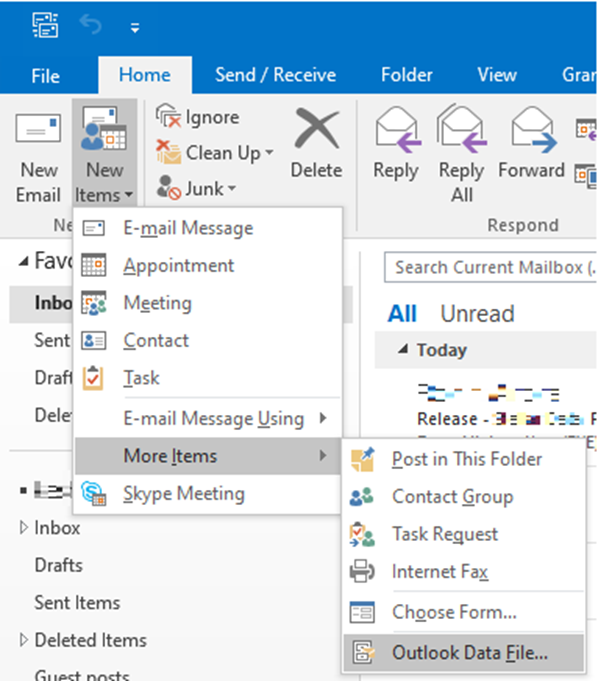
  • Go to New items > More Items > Outlook Data File.
This is the step to create new Outlook Data File:Go to New items > More Items > Outlook Data File
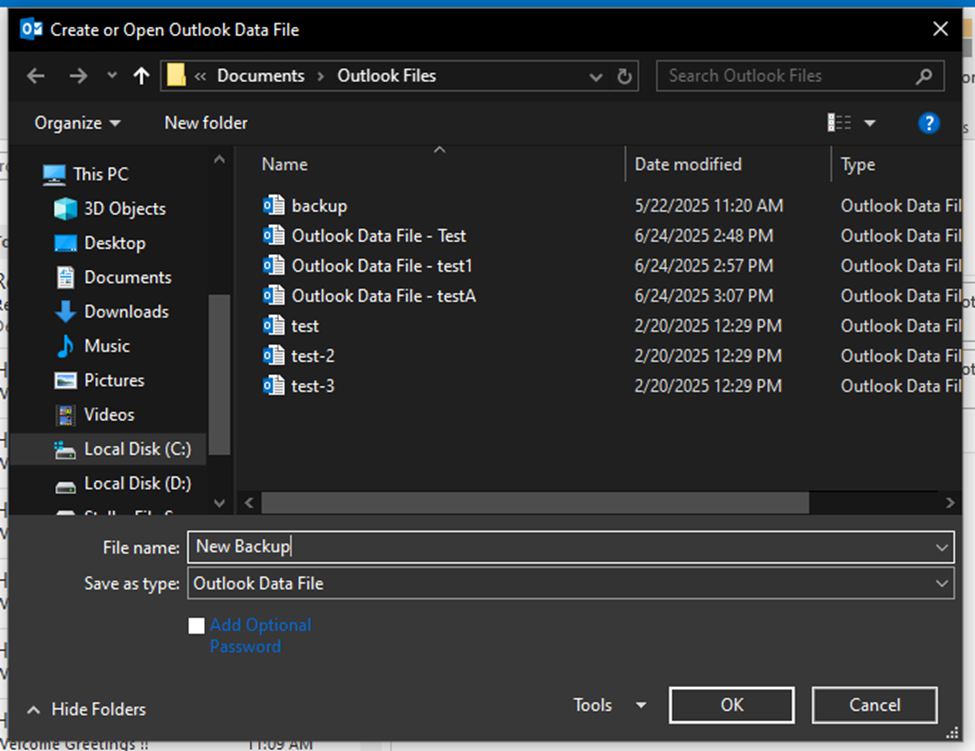
  • Give your new data file a name and click on OK.
Giving Outlook Data file a name
  • You will see the newly created PST file in the left pane in Outlook.
You will see the newly created PST file

Part 2: Merge PST files into the new PST file

After creating the PST file, you can use the Import/Export wizard to merge other PST files into it. Here are the steps:

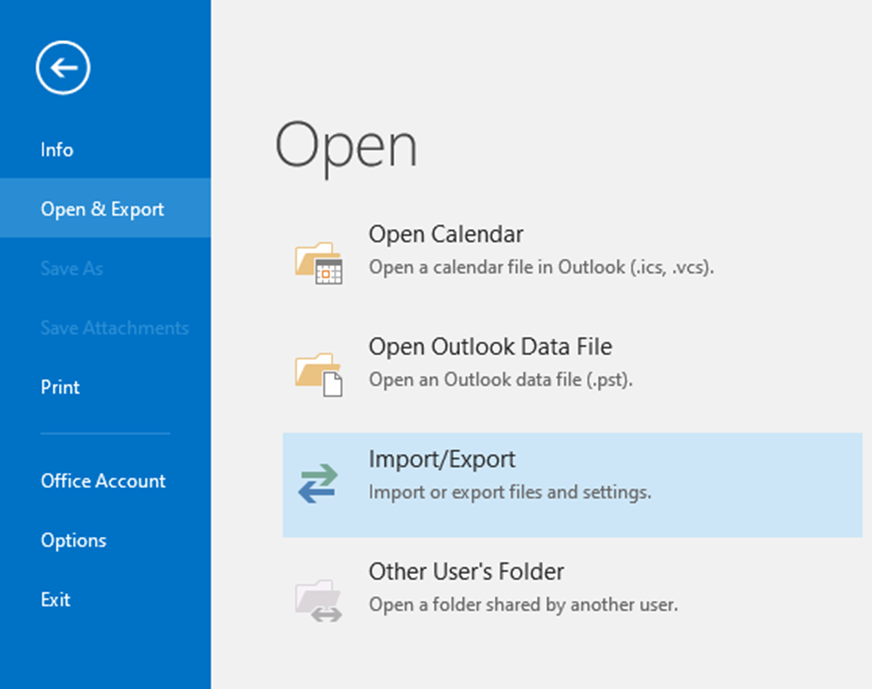
  • Click on File.
  • Go to Open & Export > Import/Export.
To open Importing/Exporting file and setting
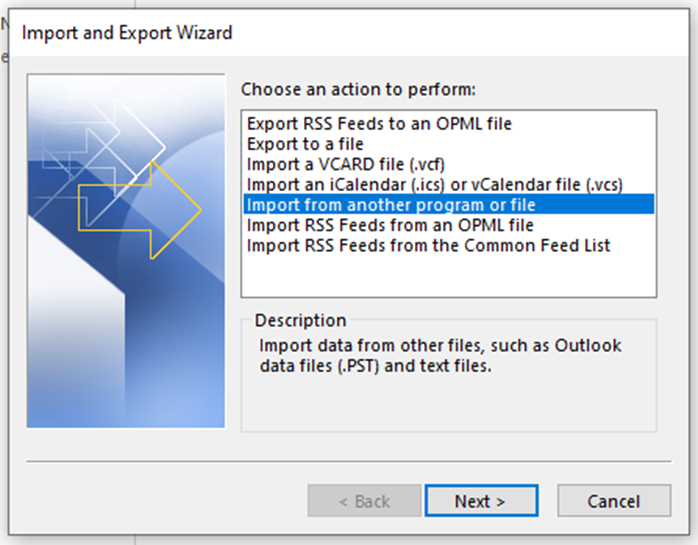
  • Select the Import from another program or file option and click Next.
Import and Export Wizard to choose an action to perform
  • Choose Outlook Data File (.pst) and click Next.
Importing a file by choosing it from the file type
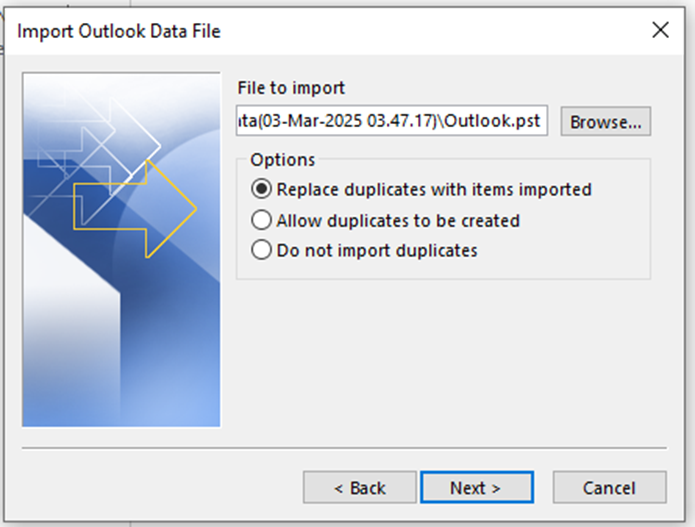
  • Browse for the PST file that you want to merge and select the desired option for duplicate items. Click Next.
Browsing for PST file that you want to merge and select the desired option for duplicate items
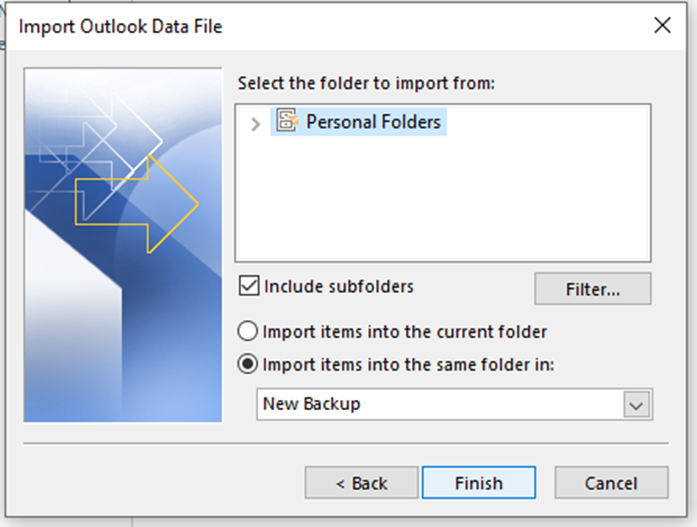
  • Select the Import items into the same folder in option and then select the new PST file. Ensure that the Include folders checkbox is selected and click Finish.
Selection of importing item into same folder and then selecting the new PST file wherein Included checkbox is selected
  • MS Outlook will begin importing the mailbox items from the selected PST file into the newly created PST file.
MS Outlook begin importing the mailbox item from the selected  PST file
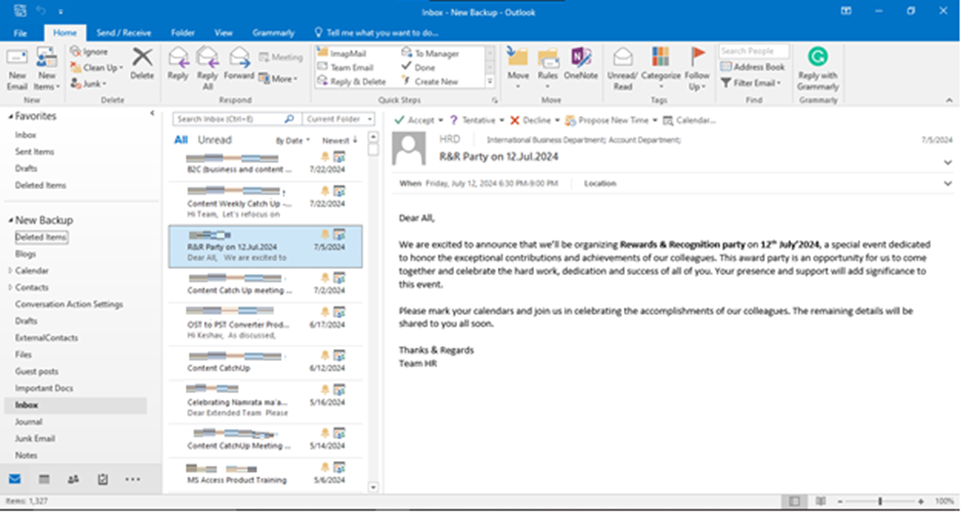
  • Once done, you will see the imported items in your newly created PST file.
You can see the imported items in your newly created PST file

Note: Similarly, you can merge other PST files into the new PST file or an existing PST file.

Drawbacks of using Import/Export Wizard to Merge PST Files

The Import/Export wizard is a free utility that lets you merge PST files. However, there are some limitations:

  • This method can only merge a single PST file in an operation.
  • The process is slow and time-consuming.
  • There are chances of missing data or data duplicity.
  • It is suitable for merging a few PST files.

Method 2: Use a Specialized Outlook PST Merge Tool

To save time and merge multiple PST files with ease, you can use Stellar Merge Mailbox for Outlook. It is a powerful PST file merge tool designed specifically to merge multiple Outlook PST files into a single PST in one operation. The tool retains folder structure and hierarchy while merging the PST files.

Here is how you can use Stellar Merge Mailbox for Outlook to merge PST files:

  • Download and install Stellar Merge Mailbox for Outlook on your system. Launch it.
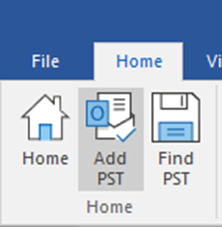
  • Click on Add PST under the Home tab.
Click on Add PST under Home Tab
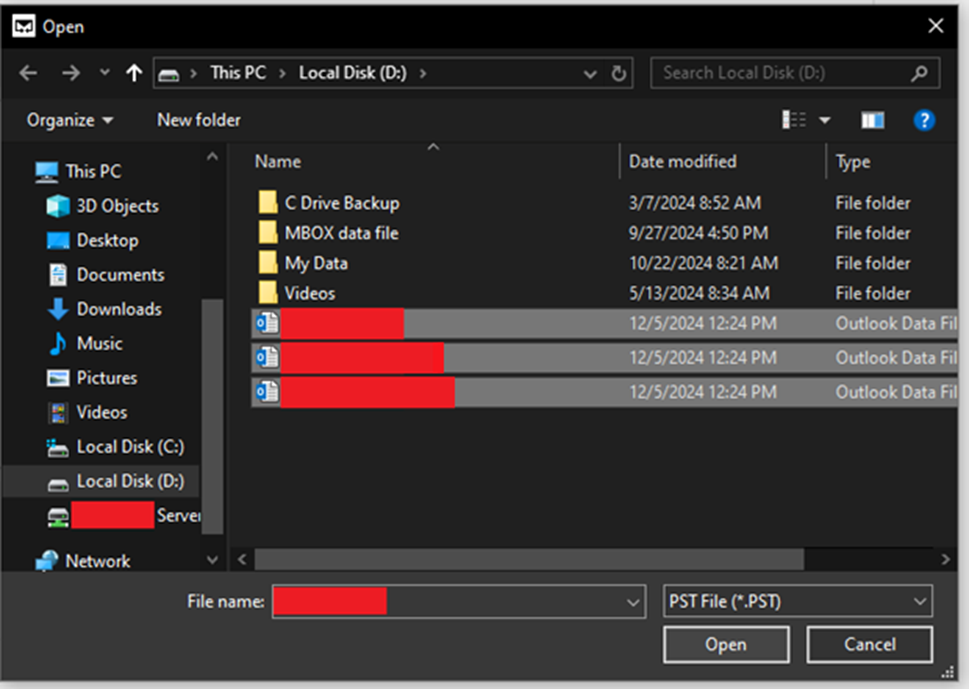
  • Browse for the PST files and click Open.
Browse for PST file
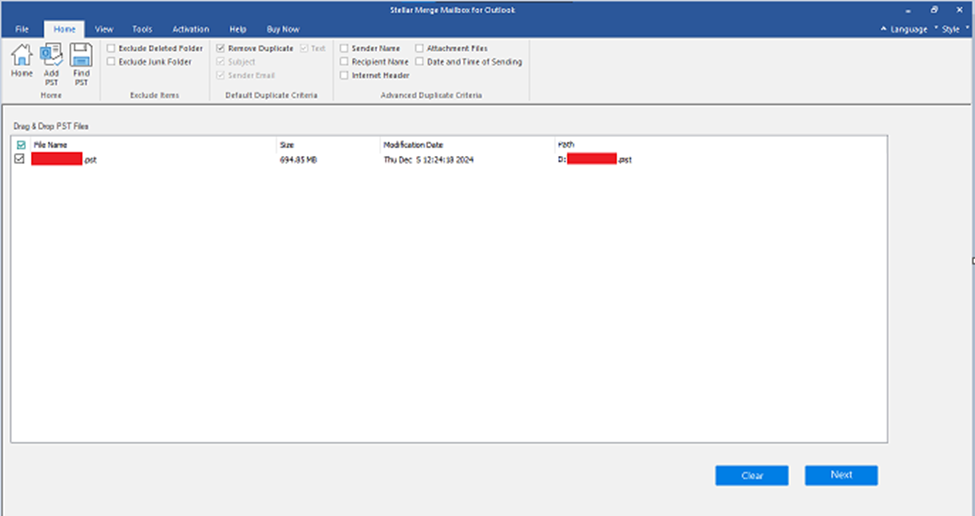
  • Once the files are added, click Next.
Files are added over here

NoteThere are additional filters, such as Remove Duplicate, Exclude Deleted Folder, etc., available in the top panel. Use them as per your discretion.

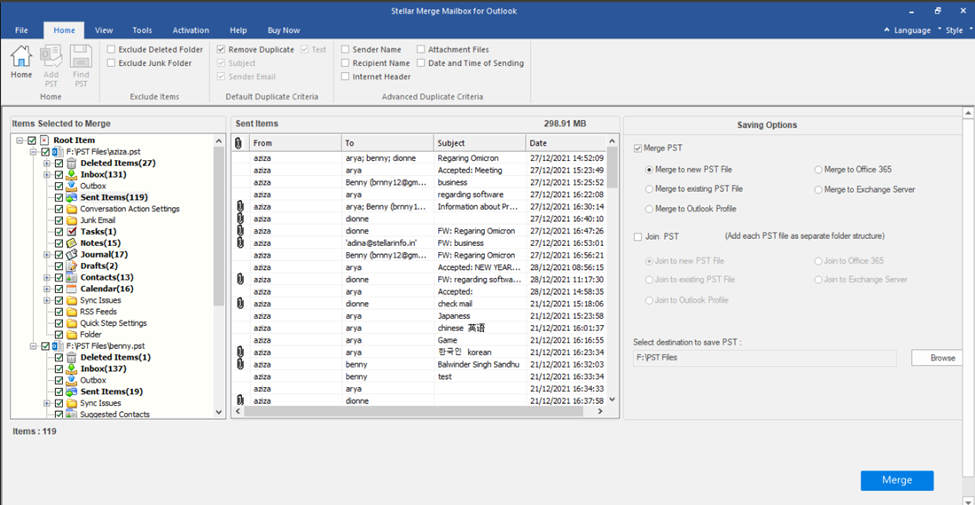
  • On the next screen, you will see the Saving Options section in the right pane.

Note – The Join PST option allows to add each PST file as a separate folder in the primary PST file.

  • Choose the Merge PST action and select an additional option under it. Click on Browse to select the destination folder to save the merged PST.
  • After making your selection, click Merge to begin merging PST files.
Make selection for merging PST file
  • After successfully merging the PST files, the software will show the Process Completed message. Click OK to end the process.

Conclusion

Merging multiple PST files into a single file improves mailbox data organization and management. It also eliminates data redundancy by removing duplicate data. You can use Outlook’s built-in Import/Export utility to merge PST files. However, the best way to merge multiple PST files is by using Stellar Merge Mailbox for Outlook. This specialized tool lets you merge single or multiple PST files in a single operation. It simplifies the PST merge process and retains the mailbox folder structure during the operation.

AI Development Services

Scaling Smarter: The Role of Agentic AI in Data-Driven Software Engineering

As modern software systems grow in complexity, scale, and ambition, so does the pressure on engineering teams to deliver faster, smarter, and with fewer resources. Traditional approaches—relying on static tooling and manual analysis—are buckling under the demands of today’s data-rich, real-time environments. In response, a new paradigm is emerging: agentic AI. Unlike conventional machine learning models, agentic AI systems operate with autonomy, adaptability, and decision-making capacity, ushering in a new era of data-driven software engineering.

This shift is not just about automation—it’s about empowerment. Agentic AI has the potential to fundamentally redefine how developers write, debug, optimize, and maintain code. When fused with real-time data analysis, these intelligent agents can act as active participants in the software development lifecycle, enabling teams to scale their work smarter—not just harder.

What Is Agentic AI?

Agentic AI refers to systems that possess goal-directed behavior, proactive decision-making capabilities, and contextual awareness. Instead of waiting passively for input, these AI agents can initiate tasks, monitor outcomes, learn from feedback, and adapt strategies over time. Think of them as intelligent collaborators—ones that not only assist but also anticipate and evolve alongside data engineering teams.

Unlike rule-based bots or reactive assistants, agentic AI frameworks can prioritize tasks, identify patterns in noisy data, explore different optimization paths, and even negotiate trade-offs. For example, an agent might identify a recurring performance bottleneck, trace it back to a problematic commit, and suggest a fix that balances performance with code readability—all without human prompting.

Why Data-Driven Engineering Needs Intelligence, Not Just Automation

The core principle of data-driven software engineering is simple: use empirical data to guide development decisions. Logs, telemetry, bug reports, test results, and production metrics all serve as signals. However, the real challenge lies in making sense of this ever-expanding ocean of information.

Human engineers struggle to process vast datasets, spot anomalies across distributed systems, or maintain situational awareness amid rapid deployments. Static dashboards and manual query tools have their limits. This is where agentic AI excels.

By continuously ingesting real-time data streams, AI agents can surface insights faster than any human could. They can evaluate performance trends, identify early warning signs of regressions, or suggest architectural changes before they become urgent. In essence, these agents act as data-native engineers—constantly learning from and adapting to their environment.

Use Cases: Agentic AI in Action

Let’s break down some specific applications where agentic AI is already transforming software development.

1. Automated Code Reviews with Contextual Awareness

Rather than scrutinizing every trivial style discrepancy, agentic AI reviewers leverage the knowledge of a team’s coding conventions, gaining insight into the underlying intent behind the changes made. They hone in on significant issues, filtering out the noise to deliver focused feedback. These intelligent reviewers offer context-aware suggestions that resonate with the intricacies of business logic and the broader framework of system architecture, ensuring that their guidance is not only relevant but also impactful.

2. Self-Healing Infrastructure

In the dynamic world of DevOps, intelligent agents serve as vigilant sentinels, continuously monitoring the pulse of infrastructure performance. With keen eyes, they detect subtle anomalies that could signal trouble ahead, then spring into action with remarkable agility. Imagine them swiftly identifying memory leaks within specific containers, gracefully rolling back deployments that falter, or automatically scaling services to meet the surging demand during peak traffic—executing these critical tasks seamlessly, all without a moment’s delay for human intervention. Their proactive intelligence transforms the landscape of infrastructure management, ensuring smooth operations in an ever-evolving digital environment.

3. Real-Time Root Cause Analysis

Debugging distributed systems can often feel like embarking on a quest to find a needle hidden deep within a vast haystack. With its remarkable capabilities, Agentic AI meticulously traces performance issues across a complex web of microservices, seamlessly correlating logs with user interactions and behaviors. It skillfully identifies the most likely root causes, illuminating the path to resolution. This innovative approach significantly slashes the mean time to resolution (MTTR), enabling a swift restoration of system stability and harmony.

4. Optimization of CI/CD Pipelines

By analyzing historical build data, AI agents can predict flaky tests, recommend pipeline optimizations, and reduce deployment latency. Over time, they learn how to reorder tests for efficiency or allocate compute resources more effectively.

5. Intelligent Feature Flag Management

In feature-driven development, toggling the right flags at the right time is critical. Agentic AI can monitor user interactions and system feedback to determine when to roll out or roll back features, ensuring smoother releases and better user experiences.

The Power of Data-Centric Agents

One of the most exciting aspects of agentic AI is its tight integration with live data. Imagine an agent embedded in your software delivery pipeline, continuously learning from logs, telemetry, and business metrics. It doesn’t just react to data—it acts on it.

This concept is already gaining traction through platforms focused on real-time analytics and event streaming—such as Redpanda, a high-performance streaming data platform that provides the low-latency infrastructure needed for autonomous AI agents to act in real time. Systems like enterprise agentic platforms enable developers to integrate with real-time data without the latency associated with traditional brokers. When paired with agentic AI, the result is an intelligent feedback loop—where insights are generated, tested, and implemented dynamically.

This interplay between streaming data and autonomous intelligence is what enables software teams to scale smarter. Instead of being overwhelmed by signals, engineers are supported by AI partners who help prioritize work, mitigate risks, and amplify productivity.

Challenges and Considerations

Despite its potential, agentic AI isn’t a silver bullet. It introduces new challenges that teams must address thoughtfully:

  • Trust and Explainability: Developers need to understand why an agent is making certain decisions. Black-box systems can create friction and resistance.
  • Security and Permissions: Agents with access to live codebases or Infrastructure must operate within clearly defined boundaries to avoid unintended consequences.
  • Human Oversight: AI should augment, not replace, human judgment. Ensuring a healthy collaboration between agents and engineers is key.
  • Data Quality: Poor input leads to poor output. Maintaining clean, consistent, and relevant data sources is critical for agentic systems to thrive.

Looking Ahead: The Future of Agentic AI in Engineering

The world is entering a new phase where software systems are not just built with AI, but alongside it. As agentic models become more sophisticated, their integration into the development lifecycle will deepen. Future agents might:

  • Act as persistent “junior developers,” assigned to specific services or modules.
  • Manage code evolution across time, automatically refactoring to maintain architectural integrity.
  • Run speculative simulations to evaluate architectural trade-offs before changes are committed.

At the organizational level, agentic AI can enable a shift toward continuous optimization, where every piece of code, every deployment, and every user interaction contributes to an evolving, self-improving system.

Final Thoughts

Scaling software isn’t just a question of hiring more engineers or adding more servers. It’s about working smarter—with tools and processes that adapt as fast as the systems they support. Agentic AI brings a fundamentally different approach: one that sees software development not as a static task but as a dynamic, intelligent process fueled by data.

As engineering teams integrate intelligent agents into their workflows, the role of reliable, high-throughput streaming platforms like Redpanda will become increasingly essential in ensuring AI decisions are driven by the freshest, most relevant data available.

By embracing agentic AI in data-driven engineering, teams can move beyond automation and into a realm of true augmentation—where AI acts as a proactive partner, enabling engineers to focus on creativity, design, and innovation. In that smarter, faster, data-native future, success won’t be measured by how much you scale—but how intelligently you do it.

Why You Don't Need a Physical Workspace to Be Successful

Why You Don’t Need a Physical Workspace to Be Successful

Whether you love or hate the idea of technology running the world, because of it, the concept of success is no longer tied to a physical office space. The traditional image of success has evolved. Today, entrepreneurs, freelancers, remote workers, and even established companies are finding that they can thrive without the overhead, constraints, and geographic limits of a physical workspace.

This shift isn’t just a trend; it’s a structural change in how work gets done. If you are in the middle of deciding the direction your business should be taking, take a few moments to explore this article and uncover why you don’t need a physical workspace to be successful.

1. The Rise of Remote Work and Digital Tools

The COVID-19 pandemic accelerated the rise of remote work, and for some businesses, they haven’t looked back. However, what many people never realized was that the foundation was already in place long before people were kept indoors. High-speed internet, cloud-based collaboration platforms like Slack, Zoom, Google Workspace, and project management tools like Asana and Trello have long allowed teams to communicate, collaborate, and manage projects seamlessly, no matter where they are. They are continuing to do so and at an even better rate than before.

With the right digital toolkit, a two-person startup can appear and operate like a 20-person company. A global team can work across time zones, delivering results 24/7, and individuals can structure their days in ways that maximize focus and creativity without commuting, cubicles, or office politics. Studies have even shown that remote workers are often more productive than their in-office counterparts, thanks to fewer distractions, more flexible schedules, and the ability to create personalized work environments.

2. Cutting Costs and Increasing Flexibility

One of the most compelling reasons you don’t need a physical workspace to succeed is cost. Office leases, utilities, furniture, cleaning services, and commuting expenses all add up. For many startups and small businesses, these overhead costs can be a major barrier to growth or even survival.

By eliminating or reducing the need for a physical office, companies can redirect resources to areas that directly impact success, including:

  • Product development
  • Marketing
  • Hiring top talent
  • Improving customer service

It also allows for greater flexibility: companies can scale up or down faster, enter new markets without setting up offices, and test new business models with less financial risk.

3. Building a Professional Image with Virtual Offices

A common worry for businesses without a physical workspace is how to maintain a professional image. That’s where virtual offices come in. Services like yourcityoffice.com offer virtual office solutions that give your business a prestigious address in major cities, including London, without the cost of renting actual office space. You get a professional mailing address, mail handling, and even phone answering services, all designed to help small businesses, freelancers, and remote teams project credibility and professionalism. This helps when dealing with clients, investors, and partners who may associate certain cities with business authority or industry leadership.

Virtual offices also offer access to on-demand meeting rooms and coworking spaces when you need them. So if you occasionally need a space to meet clients or host team sessions, you can book a professional space without committing to a full-time lease.

4. Talent Access Without Borders

Without the constraint of a physical office, businesses can tap into global talent. You’re no longer limited to hiring within commuting distance of a particular city or neighborhood. Need a software developer in Eastern Europe, a designer in Southeast Asia, or a marketing specialist in South America? With remote work, you can do just that and hire the best person for the job, regardless of location. So long as their internet connection is reliable enough, nothing is stopping you from getting the best from around the world.

This access to a global talent pool isn’t just about cost savings (though that’s often a benefit); it’s about diversity of thought, experience, and perspective. Remote teams can bring together people from different cultures and backgrounds, leading to more creative solutions, better product-market fit across regions, and a richer company culture.

5. Work-Life Balance and Employee Well-Being

Success isn’t just measured in revenue or market share; it’s also about sustainability and well-being. Employees who have control over where and how they work often report higher job satisfaction and better work-life balance. They can design their days around their most productive hours, family needs, or personal interests.

For companies, supporting flexible and remote work arrangements can reduce turnover, attract top talent, and even improve team performance. Mental health, engagement, and creativity often flourish when people are trusted to work in environments that suit them best.

6. Environmental and Social Impact

Working without a physical office also reduces a company’s environmental footprint. Fewer commutes mean less traffic congestion and lower carbon emissions, while less office space means lower energy consumption and reduced waste. You might question how this can help your business become successful. There is one simple answer to that: for companies aiming to align with sustainability goals or appeal to environmentally conscious consumers, this can be a meaningful differentiator, and with more people interested in your products or services because of your values, you could find your revenue will soar.

Socially, remote work can also promote inclusivity. Parents, caregivers, people with disabilities, and those in remote or underserved regions often have greater access to career opportunities when physical presence is no longer a barrier. This helps your business stand out to those looking for jobs, but also those wanting to only support non-toxic companies.

Redefining Success To Enjoy a Brighter and Better Future

The idea that success requires a physical workspace is outdated. While offices still serve a purpose for some industries and teams, they are no longer a universal requirement. With the right combination of digital tools, virtual office services, and a focus on outcomes rather than hours at a desk, businesses and individuals can achieve remarkable success from anywhere.

The future of work is flexible, borderless, and digital. As more companies adopt this model, they’re discovering that what truly matters isn’t where you work, but how you work.

Walkie‑Talkie

Walkie‑Talkie Built for Emergencies: Battery, Coverage, and Connectivity

For those driving long distances, alternative communication devices may be an essential component of staying in touch with your team and your family. Whether or not you’re a truck driver, you can still benefit from using two-way radios when service is lost. The challenge is understanding which radios will hold up. Traditional radios rely on radio frequencies, making them a solution for local areas and short distances.

In today’s busy world, people need to stay connected across distances, even across the country. With Long Term Evolution radios, you can get the connectivity you need. These radios support long-distance combinations, even globally, with your purchase. Connect from anywhere, nationwide, with a cellular or Wi-Fi connection.

The built-in network redundancy makes it possible to switch to an available network if disruptions occur. Below, we discuss the essentials of advanced two-way radio communication and why it can be relied on as an alternative communication device. We’ll cover the basics of their batteries, coverage, and connectivity. For more information on LTE walkie-talkie devices, continue reading below.

LTE Walkie-Talkie Batteries

LTE walkie-talkie devices for two-way communication and mobile bandwidth usually rely on lithium-ion batteries. These are the chosen battery type for most LTE radios because they contain a high energy density, which makes them capable of storing more power in a smaller design, unlike some alternative battery types. Lithium-ion batteries last longer than others without reduced capacity issues.

Li-ion batteries provide longer use times with one charge. They are also smaller than other batteries, making them convenient for portable devices. Additionally, they also charge faster than other kinds of batteries and can be charged at any point without capacity issues.

Two-Way Radio Coverage

Two-way walkie-talkie coverage can vary by the provider and the technologies used. Long-Term Evolution radios often have nationwide coverage that is accessible through the use of network redundancy. When companies partner with all cellular networks and internet connections, users can maintain stable coverage and connection even when there are disruptions.

These radios switch to another available network when there are drops, helping users maintain a connection at all times. As long as a Wi-Fi or cellular network is available, LTE two-way walkie-talkie devices should maintain nationwide coverage. Some providers require that you purchase an add-on if you want global coverage included.

Radio Device Connectivity

The providers of the LTE radios you’re considering may partner with all existing cellular networks and leverage Wi-Fi to give you access to nationwide coverage. With automatic switching to networks when service drops, you’re capable of maintaining connectivity nationwide. With built-in redundancy, it’s easy for your device to go to another network, keeping you connected.

A Helpful Tool For Connection

You may find it necessary to have alternative communication devices available for personal or professional use. Whether you’re a first responder or vacationing in a cabin retreat, there are locations where smartphone service is limited. In these cases, radios can be a helpful tool to keep you connected. Check out LTE walkie-talkie devices for emergencies to learn more.

Retail Profits

How to Boost Retail Profits Using AI and Automation

The retail landscape has transformed dramatically over the past few years, and businesses that fail to embrace technological innovation risk being left behind. Artificial intelligence and automation are no longer futuristic concepts—they’re essential tools that can significantly boost your retail profits whilst streamlining operations. Let’s explore how these technologies can revolutionize your business approach.  

The Modern Retail Challenge

Today’s retailers face unprecedented challenges. Consumer behaviour shifts rapidly, competition intensifies by the day, and profit margins remain under constant pressure. Traditional manual processes that once sufficed are now cumbersome bottlenecks that prevent businesses from responding quickly to market changes.

The key lies in leveraging data effectively. Modern retailers generate enormous amounts of information daily, from customer purchasing patterns to inventory movements and supplier interactions. However, without the right tools to analyse and act upon this data, it becomes overwhelming rather than advantageous.

The Power of AI in Retail Decision-Making

Artificial intelligence excels at processing vast datasets and identifying patterns that human analysis might miss. In retail, this capability translates into actionable insights that can dramatically improve profitability.

AI systems can predict customer demand with remarkable accuracy, helping you stock the right products at optimal levels. They analyse historical sales data, seasonal trends, weather patterns, and even social media sentiment to forecast what customers will want and when they’ll want it.

Furthermore, AI eliminates much of the guesswork from pricing strategies. Dynamic pricing algorithms can adjust prices in real-time based on demand, competitor pricing, inventory levels, and numerous other factors, ensuring you maximise revenue whilst remaining competitive.

Streamlining Operations Through Automation

Automation focuses on eliminating repetitive, time-consuming tasks that drain your team’s productivity. By automating routine processes, your staff can concentrate on strategic activities that directly impact profitability.

Consider inventory management, which is traditionally a labour-intensive process prone to human error. Automated systems can track stock levels continuously, automatically reorder products when quantities fall below predetermined thresholds, and even predict optimal reorder quantities based on demand forecasting.

Similarly, automated reporting systems can generate comprehensive performance analyses without manual data compilation, providing real-time insights into sales trends, profit margins, and operational efficiency.

Intelligent Merchandising: The Future of Product Presentation

Intelligent merchandising represents a significant evolution from traditional product placement strategies. This approach uses AI to determine optimal product positioning, both in physical stores and online platforms.

AI algorithms analyse customer behaviour patterns, purchase histories, and browsing data to identify which products should be displayed together, how they should be positioned, and when promotional offers might be most effective. This data-driven approach to merchandising can substantially increase average transaction values and overall sales.

The technology also enables personalised shopping experiences, showing different product recommendations to different customers based on their individual preferences and shopping habits. This level of personalisation was previously impossible at scale but is now achievable through sophisticated AI systems.

Promotion Planning: Maximising Campaign Effectiveness

Effective promotion planning requires careful consideration of timing, product selection, discount levels, and target audiences. AI transforms this complex process by analysing historical promotion performance, customer response patterns, and market conditions to recommend optimal promotional strategies.

Rather than relying on intuition or limited historical comparisons, AI can process vast amounts of data to predict which promotions will generate the highest return on investment. This includes identifying the best times to run specific promotions, which customer segments to target, and what discount levels will maximise both sales volume and profitability.

Promotion management software further enhances this process by automating campaign execution, tracking performance in real-time, and making dynamic adjustments to improve results. This level of sophistication ensures that promotional budgets generate maximum impact.

Collaborative Planning and Supplier Relationships

Modern retail success increasingly depends on effective collaboration with suppliers. AI and automation facilitate this collaboration by providing real-time visibility into demand forecasts, inventory levels, and promotional plans.

Automated systems can share relevant data with suppliers instantly, enabling them to adjust production schedules and delivery timelines accordingly. This collaboration reduces stockouts, minimises excess inventory, and often unlocks additional supplier funding for promotional activities.

The transparency provided by these systems builds stronger supplier relationships whilst ensuring that both parties work towards common goals of maximising sales and profitability.

Price Optimisation: Beyond Simple Competition Matching

Traditional pricing strategies often involve simple competitor price matching or cost-plus calculations. AI-driven price optimisation considers far more variables, including customer price sensitivity, product elasticity, inventory levels, and broader market conditions.

These sophisticated systems can automatically adjust prices across thousands of products simultaneously, ensuring optimal profitability whilst maintaining competitive positioning. The result is often significant margin improvements without sacrificing sales volume.

Implementation Strategies for Success

Successfully implementing AI and automation requires careful planning and gradual adoption. Start by identifying the areas where manual processes create the most significant bottlenecks or where data analysis could provide immediate value.

Begin with pilot projects in specific categories or departments before rolling out solutions company-wide. This approach allows you to refine processes, train staff effectively, and demonstrate clear return on investment before making larger commitments.

Staff training plays a crucial role in successful implementation. While automation reduces manual work, it requires team members to develop new skills in data interpretation and system management. Investment in training ensures that your team can maximise the benefits of new technologies.

Measuring Success and Continuous Improvement

The beauty of AI and automation lies in their ability to provide measurable results. Track key performance indicators such as profit margins, inventory turnover, promotion effectiveness, and operational efficiency to quantify the impact of these technologies.

Regular analysis of these metrics enables continuous refinement of your approach. AI systems learn and improve over time, becoming more accurate and effective as they process more data and receive feedback on their recommendations.

The Future of Retail

Platforms like Retail Express are pioneering these technologies, helping retailers transform their operations and achieve significant improvements in profitability. The future belongs to retailers who embrace these tools and use them strategically to enhance customer experiences whilst optimising business performance.

The integration of AI and automation in retail operations isn’t merely about keeping up with technology trends—it’s about creating sustainable competitive advantages that directly impact your bottom line. By leveraging these powerful tools, retailers can work smarter, respond faster to market changes, and ultimately achieve the profit growth that drives long-term success.

Business Phone System Today

The Reasons Why Your Growing Australian Business Needs a Business Phone System Today

Your current business operates in a very digital age and any Australian business would find it extremely difficult to operate if it wasn’t using all of the technology that is currently available to be able to properly communicate with suppliers, with staff members and with customers. The right kind of communication is essential when it comes to your overall business strategy and more efficient and more effective operations.

If the communication channels are not open between staff members in the workplace then your business is sure to fail. This is why it makes perfect sense to invest your time and money into a very affordable small business phone system that provides the perfect channel for communication. If you are somewhat reluctant to invest time and money into such a system then the following are some of the top reasons why your growing Australian business needs such a system today.

In today’s customer-driven world, seamless communication can be the difference between a loyal customer and a lost opportunity. Modern business phone systems offer features that enhance service, improve team efficiency, and reduce costs — all while helping your brand stand out in a competitive market.

✅ 1. Improved Customer Service

Today’s customers expect fast, efficient, and human responses. Unfortunately, many businesses rely heavily on automated systems that frustrate users and damage brand trust. With a modern business phone system:

  • Calls are answered quickly by the right person, reducing wait times and hang-ups.
  • Call queues and auto-attendants ensure customers are routed to the relevant department without unnecessary transfers.
  • Call recording and monitoring help improve service quality through training and accountability.
  • Voicemail-to-email transcription ensures no message is ever missed.

This human-centric approach not only improves the customer experience but increases the likelihood of repeat business and positive word-of-mouth.

✅ 2. Reduced Pressure on Staff

Employees already manage heavy workloads — handling a disorganized phone system shouldn’t be part of their stress.

  • Smart call routing automatically directs calls based on caller input or agent availability.
  • Mobile integration allows staff to take and return calls on the go, staying productive even outside the office.
  • User-friendly interfaces require little to no technical expertise, enabling quick onboarding and use.
  • Do Not Disturb and call scheduling features allow focused work time without missing urgent calls.

This reduces interruptions, minimizes internal confusion, and helps your team focus on their core responsibilities.

✅ 3. Enhanced Workflow and Productivity

Efficient communication is the backbone of any well-run business. A smart phone system contributes to smooth internal operations by:

  • Enabling team collaboration through group calls, internal extensions, and direct dialing.
  • Integrating with CRMs and helpdesk software, allowing agents to access customer details during a call.
  • Automating repetitive tasks like follow-up reminders, voicemail alerts, and missed call notifications.
  • Offering real-time analytics to monitor call volumes, performance, and resolution times.

With less time spent on logistics and manual coordination, your team can focus on strategic, high-value tasks.

✅ 4. Lower Operational Costs

One of the greatest advantages of modern phone systems, especially VoIP (Voice over IP) and cloud-based platforms, is cost efficiency.

  • No expensive hardware installations for each employee — all you need is an internet connection.
  • Scalable plans let you pay for only what you use and easily add or remove lines as your business grows.
  • Free or low-cost internal calls save significantly on interoffice communication.
  • Remote work capabilities reduce the need for physical office space and infrastructure.

These savings directly impact your bottom line, giving you more resources to invest elsewhere in the business.

✅ 5. Staying Competitive

In a saturated market, customers have endless choices. A missed call, delayed response, or poor interaction can easily send them to your competitor.

  • Reliable communication builds brand credibility.
  • Professional call handling shows your customers that you take their concerns seriously.
  • Speed and efficiency can win you more clients than pricing alone.

Reacquiring lost customers is expensive. Retaining them through excellent communication is cost-effective and more sustainable.

💡 Conclusion

A modern business phone system is more than just a communication tool — it’s a strategic investment in customer satisfaction, employee efficiency, and business growth. In a world where every missed call could be a missed opportunity, having the right system in place ensures you stay ahead of the competition, both operationally and reputationally.